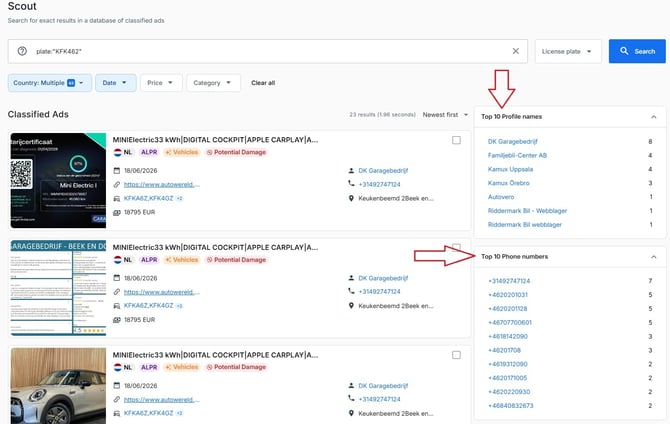
After performing a search, widgets may appear on the right-hand side of the results page.
Available Widgets
Depending on the search results, Scout can display:
-
Top 10 Profile Names
-
Top 10 Phone Numbers
These widgets are generated from the advertisements returned by your search and can be used to conduct further investigation by clicking on them and triggering a new search.
Why Are Widgets Useful?
Widgets help you quickly identify recurring entities across multiple advertisements.
For example, you may discover:
-
A profile name appearing across several listings
-
A phone number connected to multiple advertisements
-
Potential links between seemingly unrelated results
This can help guide further investigation and identify valuable leads more efficiently.
When Are Widgets Displayed?
Widgets are displayed when sufficient data is available in the search results.
In some cases, widgets may not be shown if the result set is too large or does not contain enough relevant information.