How to Search
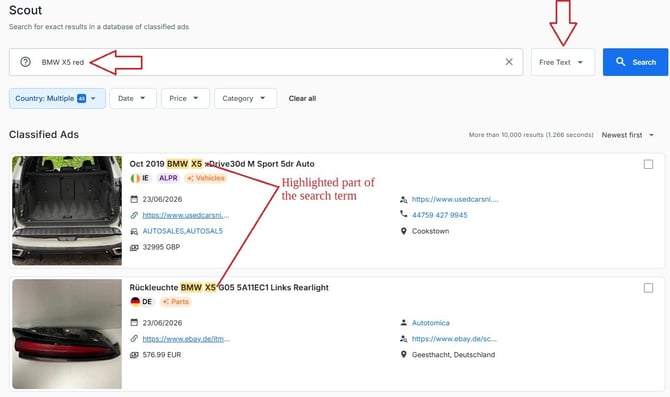
Enter one or more keywords directly into the search bar. Examples:
-
Audi A3
-
BMW X5 red
-
motorcycle trailer
- although using identifiers for specific searches is recommended, results can also be shown when searching for a license plate, VIN, phone number etc., but these results might be broader and could include more false positives
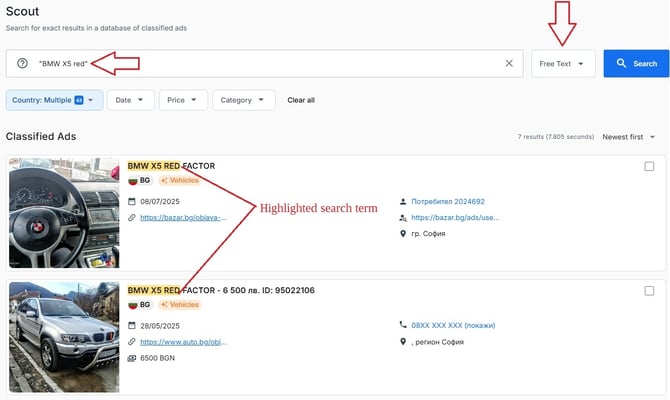
You can also search for exact phrases using quotation marks:
- "BMW X5 red"
-
"Audi A3 TFSI"
What You Can Find
Depending on available data, results may include:
-
Advertisement titles
-
Vehicle descriptions
-
Product details
-
Seller-written content
-
Historical advertisements containing the keywords
Tips
-
Start with broader keywords and narrow your search as needed.
-
Use quotation marks for exact phrase searches.
-
Combine keywords with filters to reduce false positives.
- Combine search terms with locations (cities, zipcodes etc.)
-
Consider alternative spellings, abbreviations, or language variations when searching internationally.