Search Operators
Using the appropriate search operator helps Scout understand exactly what type of information you are searching for. For example, searching for a license plate using the dedicated identifier plate: can produce significantly more accurate results than performing a general keyword search.
For detailed guidance on using search operators and identifiers, see the Search Methods articles:
Each article includes search examples, best practices, and guidance on interpreting results.
Exact Phrase Searches
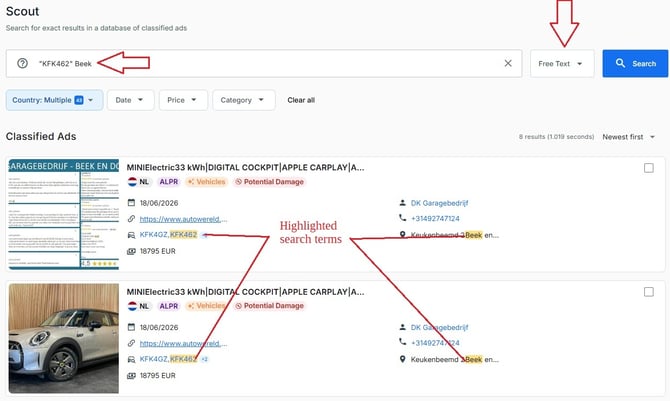
Use quotation marks to search for an exact phrase:
-
"BMW X5 red" - this will return results containing the exact phrase rather than advertisements containing the individual words separately.
-
Audi "A3 TFSI" - this returns advertisements containing "Audi" and the exact phrase "A3 TFSI".
- "KFK462" Beek - this returns results for the license plate + a city name
Using Filters
After running a search, filters can be used to narrow down the results. Available filters include:
-
Country - select one or multiple Countries
-
Date - select a start and an end date for a narrower time frame to display results
-
Price - select a minimum and maximum price to narrow down results
-
Category - select one or more specific categories of objects
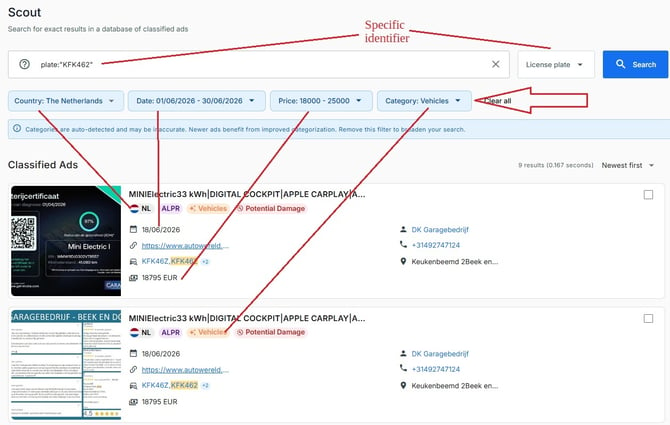
Combining advanced searches with filters can significantly improve result quality and reduce irrelevant matches.
Best Practices
-
Start with unique identifiers whenever possible.
-
Use exact phrases when searching for specific terms.
-
Apply filters to narrow broad result sets.
-
Review historical advertisements for additional context and connections.